
Tools were evaluated based on what matters most to freelancers and small business owners who handle contracts without in-house legal support.
| Criterion | Weight | How Scored |
|---|---|---|
| Risk Detection Accuracy | 35% | Percentage of known risky clauses correctly identified across 5 test contracts, verified against attorney markup |
| Plain-Language Output | 25% | Whether explanations are actionable for someone without legal training, rated on a 3-point scale (jargon / mixed / plain) |
| Contract Type Coverage | 15% | Number of contract types the tool handles well (NDAs, leases, freelance, employment, vendor agreements) |
| Pricing Transparency | 15% | Whether pricing is published, whether there are hidden limits, and cost per contract at typical usage levels |
| Data Privacy | 10% | Whether the tool stores uploaded contracts, uses them for model training, or shares data with third parties |
Test Parameters
- Dataset:
- 5 contracts with 47 total known issues pre-identified by a licensed attorney
- Contract types:
- NDA, Freelance Agreement, Residential Lease, SaaS Terms of Service, Independent Contractor Agreement
- Process:
- A licensed attorney reviewed each test contract and identified all risky or unusual clauses. Each tool then reviewed the same contracts. We compared tool output against the attorney baseline. Accuracy = correctly flagged issues / total known issues. Each tool was tested in its default configuration without custom prompting.
For freelancers and small businesses reviewing contracts without in-house counsel, ContractCrab and Contract Analyze offer the strongest AI-powered review under $100/month. Neither is right for everyone.
We evaluated five dedicated contract review tools plus ChatGPT and Claude across six criteria: price, what each tool catches, explanation quality, ease of use, platform availability, and data privacy. The right pick depends on your budget, your device, and how many contracts you review each month.
Quick Comparison Table
All pricing verified as of April 2026. Ratings reflect value for freelancers and SMBs, not enterprise buyers.
| Tool | Price | Platform | Best For | Risk Scoring | Plain English | Rating |
|---|---|---|---|---|---|---|
| Legitt AI | Free (10/mo); $14.99/user/mo | Web | Freelancers who want free, browser-based review | Yes | Yes | 6/10 |
| ChatGPT Plus | Free tier; $20/mo | Web, mobile | Quick gut-check on a single NDA or freelance contract | No | Yes | 5/10 |
| Claude Pro | Free tier; $20/mo | Web, mobile | Privacy-conscious users who want plain-English clause explanations | No | Yes | 5/10 |
| ContractCrab | $3/contract; $30/mo (120 docs) | Web | SMBs reviewing 5–30 contracts/month who need structured output | Yes | Yes | 7/10 |
| Pact | Free tier; $49.99/year | iOS, iPad, Mac | iPhone/iPad users reviewing leases, NDAs, or freelance contracts | Yes | Yes | 7/10 |
| goHeather | $99/mo; $950/year | Web + Word add-in | Small firms that draft AND review in Microsoft Word | Yes | Yes | 6/10 |
| Spellbook | ~$99–350/user/mo | Word add-in | Practicing attorneys who need AI-assisted drafting and review | Yes | Partial | 6/10 |
SpotDraft and LawGeex serve enterprise buyers with custom pricing. They are not reviewed here.
How We Evaluated These Tools
We tested each tool’s ability to do three things: flag risks in contract language, explain what those risks mean in plain English, and identify missing provisions a signer should ask about. Six criteria shaped the ratings:
- Price — what a single freelancer or small business owner actually pays
- What it catches — clause-level risk identification, missing-provision detection
- Explanation quality — does the tool tell you why something is risky, or just highlight it?
- Ease of use — time from signup to first reviewed contract
- Platform — web, mobile, Word integration, OS restrictions
- Privacy — does the tool train on your documents? What’s the data retention policy?
Disclosure: Contract Analyze is developed by Shepherdstack LLC, which publishes this blog. We review it alongside competitors using the same criteria.
For guidance on when AI review is sufficient and when you should hire an attorney instead, see AI Contract Review vs. Lawyer: When You Need Each.
The Reviews
Legitt AI
Legitt AI is the easiest free starting point. Create an account, upload a PDF or Word file, and get a clause-by-clause breakdown with no payment required for up to 10 contracts per month.
Strengths:
- 10 free reviews per month with no credit card
- Browser-based, works on any device with internet
- Clause extraction with risk tagging
- Generates summary reports you can share with colleagues
Limitations:
- Free tier caps at 10 contracts/month; the $14.99/month plan raises that limit, but feature documentation is thin on specifics
- Explanation depth is adequate for standard clauses but surface-level on unusual provisions
Pricing: Free (10 contracts/month), $14.99/user/month (Standard), $24.99/user/month (Premium)
Best for: Freelancers on any device who review fewer than 10 contracts per month and don’t want to pay anything.
Verdict: A solid free option that handles the basics. Upgrade to a paid tool if you need deeper risk analysis or review more than 10 documents monthly.
ContractCrab
ContractCrab charges per contract ($3 each) or by monthly subscription ($30 for 120 documents). That pay-as-you-go model fits businesses with uneven contract volume: you pay when you have work, not when you do not.
Strengths:
- Per-contract pricing eliminates wasted subscription months
- Structured risk scoring with severity levels
- Web-based dashboard organizes reviewed contracts
- Supports bulk upload for teams processing batches
Limitations:
- No permanent free tier (free trial only)
- $3/contract adds up fast if you review 50+ documents monthly (the $30/month plan is cheaper past 10 contracts)
- No Word add-in; upload-only workflow
Pricing: $3/contract (pay-as-you-go), $30/month (120 documents), $75/month (500 documents)
Best for: Small businesses reviewing 5–30 contracts per month that want structured risk reports without an annual commitment.
Verdict: The most practical option for SMBs with regular but moderate contract volume. The $30/month tier hits the sweet spot between cost and capability.
Pact (Contract Analyze)
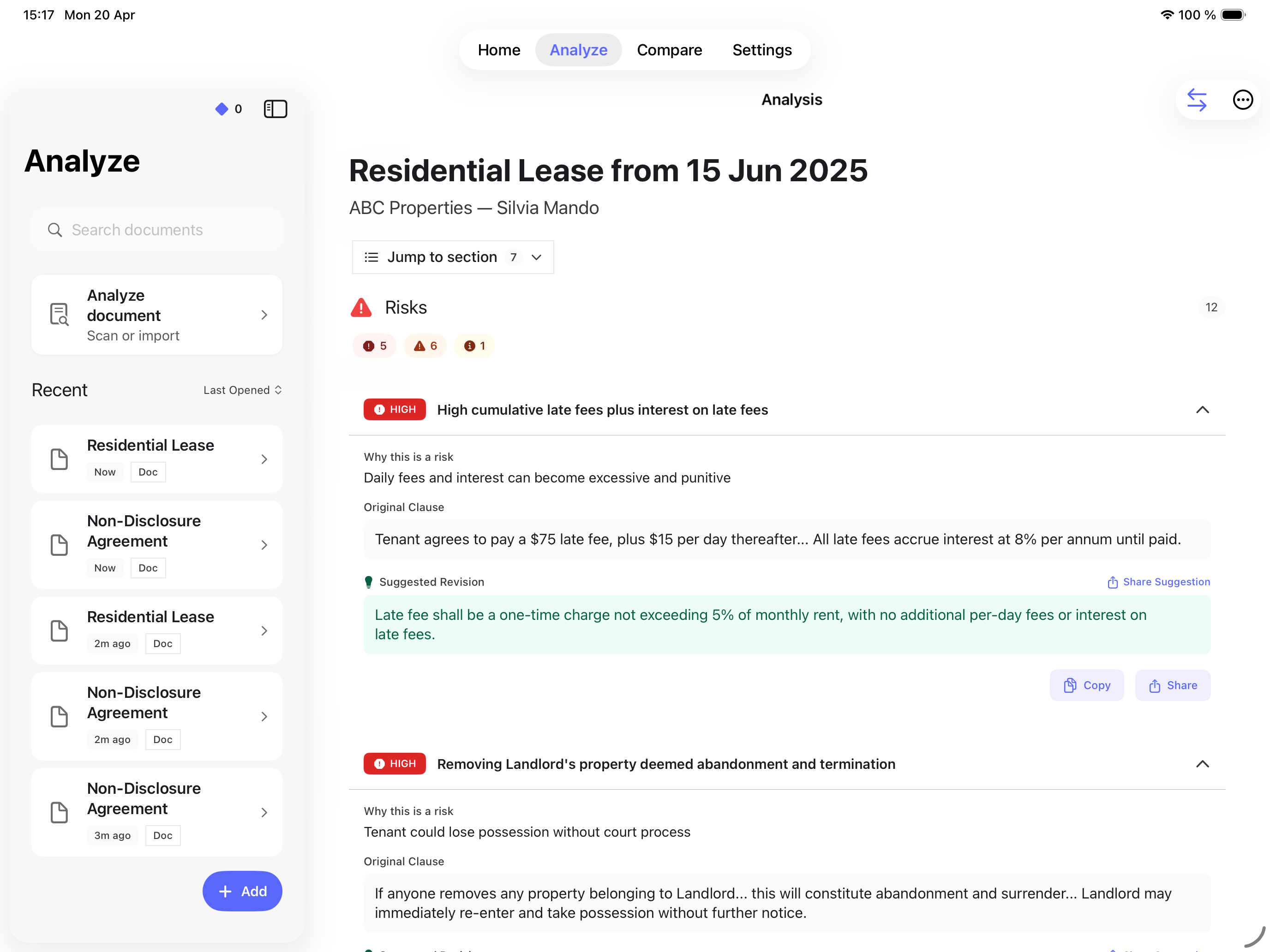
Contract Analyze runs on iPhone, iPad, and Mac only. No Android app, no web version. That is its biggest limitation and the first thing to know. For Apple users, it offers the deepest risk analysis in this price range: clause-by-clause scoring, plain-English explanations of what each provision means, and specific flags for missing force majeure clauses or one-sided liability caps.
Strengths:
- Risk scoring with severity ratings per clause
- Plain-English explanations written for non-lawyers
- Purpose-built analysis for lease reviews, NDAs, and other common contract types
- Free tier available for limited monthly reviews
- $49.99/year is the lowest annual cost in this comparison
Limitations:
- Apple only. No Android, no Windows, no web version. This excludes most potential users.
- No Microsoft Word integration
- Smaller feature set than enterprise tools: no clause library, no redlining, no team collaboration
- Free tier review count is limited
Pricing: Free (limited reviews/month), $7.99/week, or $49.99/year
Best for: iPhone or iPad users who review freelance contracts, leases, or NDAs and want detailed risk analysis at under $50/year. For free options, see our guide to tools that cost nothing.
Verdict: Strongest risk analysis per dollar, but the Apple-only requirement is a dealbreaker for most people. If you’re in the Apple ecosystem, it’s the best value here. For the full standalone review, see our Contract Analyze review.
goHeather
goHeather is built for people who draft and review contracts in Microsoft Word. Its Word add-in lets you analyze a contract without leaving the document: no uploading, no switching tabs, no copy-paste.
Strengths:
- Word add-in for in-document review
- Clause library for comparing your terms against market standards
- Web dashboard for contract management
- Designed for Canadian and US contract law
Limitations:
- $99/month ($950/year) is the most expensive dedicated tool in this comparison
- Requires Microsoft Word; no Google Docs, no standalone mobile review
- The free tier provides limited insights, not full reviews
Pricing: Free (limited insights), $99/month, or $950/year
Best for: Small businesses that draft contracts in Word and want AI review integrated into their existing workflow (if the $99/month budget works).
Verdict: The Word integration is genuinely useful if you live in Microsoft Office. The price is steep for a freelancer but reasonable for a small firm reviewing 10+ contracts monthly.
Spellbook
Spellbook targets practicing attorneys, not the freelancers and SMB owners this article is written for. It is included here because it appears on every “best AI contract review” list, and you should know why it probably isn’t for you.
Strengths:
- Deep Word integration with AI-assisted drafting (not just review)
- Trained specifically on legal language
- Clause suggestions and contract generation
- Built for law firms managing high contract volume
Limitations:
- No public pricing — estimates range from $99 to $350/user/month, making it the most expensive option here by a wide margin
- 7-day trial only; no free tier
- Designed for licensed attorneys, not business owners reviewing their own contracts
- Overkill for someone reviewing 1–5 contracts per month
Pricing: 7-day free trial; ~$99–350/user/month (no public pricing page)
Best for: Practicing attorneys who want AI assistance across drafting, review, and negotiation inside Word.
Verdict: A strong tool for lawyers. Not the right fit for a freelancer checking an NDA before signing. If you are a lawyer reading this, Spellbook is worth a trial. If you are not, look at the other four options first.
What About ChatGPT and Claude?
Most individuals do not use dedicated contract review tools. They paste the contract into ChatGPT or Claude and ask “what should I worry about?” That works better than you might expect, and worse than vendors of dedicated tools want to admit.
What general-purpose LLMs do well:
- Explain contract clauses in plain English. Ask “what does this indemnification clause mean for me?” and both ChatGPT and Claude give clear, accurate answers for standard provisions.
- Identify obvious red flags: unlimited liability, automatic renewal without notice, broad non-compete language.
- Free tiers on both platforms handle occasional contract checks without any subscription.
What they miss:
- No structured risk scoring. You get prose, not a ranked list of issues by severity.
- Inconsistent clause detection. The same contract pasted twice may produce different flags depending on how you phrase the prompt.
- No document version comparison. Dedicated tools compare versions side by side. LLMs can’t track changes across drafts.
- No memory between sessions. Upload the same contract next week and the LLM starts from scratch.
The privacy difference matters. ChatGPT may use your conversations to train future models unless you disable that setting in your account. Claude Pro and Team plans do not use conversations for model training; free-tier Claude conversations may be used for training unless you opt out. Dedicated contract review tools have varying data policies. Contract Analyze, for instance, processes data through a third-party AI partner whose terms may allow model training. Check each tool’s privacy policy before uploading anything sensitive. For a deeper look, see our breakdown of data privacy in legal AI tools.
When ChatGPT or Claude is enough: You’re reviewing a single, standard contract (a freelance agreement, a simple NDA, a month-to-month lease) and you want a quick read on what the terms mean. Low stakes. One-time check.
When you need a dedicated tool: You review contracts regularly, you want consistent risk scoring across documents, you need to track which provisions are missing, or you’re comparing a redlined version against the original. The structure and repeatability of a dedicated tool save time over re-prompting an LLM for each new contract.
For a deeper look at how AI contract review works under the hood, including why dedicated tools catch things that general LLMs miss, see our technical explainer.
Which Tool Is Right for You?
Match your situation to the recommendation:
- Budget: $0, Apple device → Contract Analyze free tier. Deepest free risk analysis on iOS.
- Budget: $0, Android or Windows → Legitt AI free tier (10 reviews/month) or ChatGPT free.
- Budget: $0, just need a quick check on one contract → Paste it into ChatGPT or Claude. For a single low-stakes contract, a general LLM is fine.
- Budget: $30–50/month, regular contract flow → ContractCrab ($30/month for 120 documents). Best value for consistent volume.
- Budget: under $50/year, Apple user → Contract Analyze annual plan ($49.99/year). Lowest annual cost.
- Need Word integration → goHeather ($99/month) if you want review. Spellbook ($99+/month) if you also need AI-assisted drafting.
- Want a human attorney in the loop → Use any AI tool for first-pass triage, then send flagged issues to a lawyer. The AI cuts your attorney’s billable time. See AI Contract Review vs. Lawyer: When You Need Each.
- Enterprise or high volume (500+ contracts/month) → SpotDraft or LawGeex. They are not reviewed here; both require custom pricing conversations.
Frequently Asked Questions

About Vlad Kuzin
Founder & CEO, Shepherdstack LLC
Vlad Kuzin is the founder of Shepherdstack LLC and creator of Pact, an AI-powered contract review tool. He builds software that helps individuals and small businesses understand the documents they sign.
Disclosure: Founder of Shepherdstack LLC, the company behind Pact. All comparison articles use a standardized evaluation methodology applied equally to all tools, including Pact.